
Learn the controls
Mode 2 at a glance
Throttle, yaw, pitch and roll — with an exercise for each axis.
Mode 2 puts throttle and yaw on the left stick and pitch and roll on the right. Learn each axis on its own before combining them.
You'll need
An RC 3 or the on-screen virtual sticks. Start in Normal mode.
What you'll learn
- Name the four axes and the stick direction that produces each one.
- Climb, descend, turn, move forward and move sideways deliberately.
- Complete one isolation exercise per axis without touching the others.
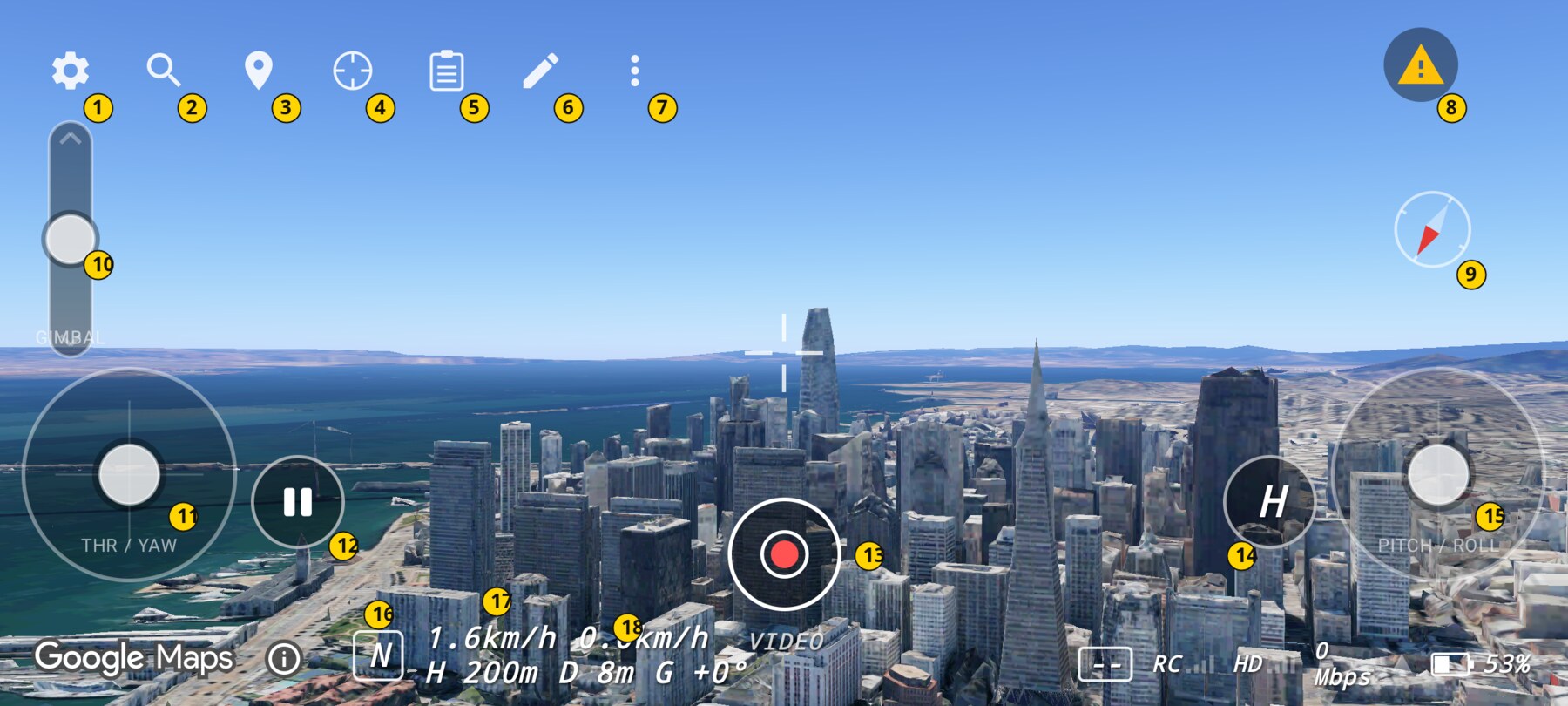
Left stick — throttle (vertical)
Push the left stick up to climb and pull it down to descend. In Normal and Sport the stick is spring-centred, so the centre position holds the current height. Altitude hold means pitching or rolling should not change height; only this axis does.
In Manual, throttle is raw thrust. Centre is mid-thrust, not hover, and there is no altitude hold.
Exercise: gentle climb and descend
- Hold a hover over the Transamerica Pyramid.
- Push the left stick up slightly for one second, then release.
- Watch H increase. Confirm D (distance home) barely changes.
- Pull down slightly for one second and release. Confirm H returns toward its previous value.
Left stick — yaw (horizontal)
Move the left stick left or right to rotate the drone around its vertical axis. Yaw changes where the camera points without intentionally moving the drone toward the subject. The compass and the view rotate together.
Exercise: face a landmark without approaching it
- Start with the Transamerica Pyramid off to one side of the frame.
- Yaw slowly until the pyramid is centred.
- Release. The drone should rotate in place; D should stay roughly the same.
- Repeat in the other direction.
Right stick — pitch (vertical)
Push the right stick up to move forward and pull it down to move backward. In Normal and Sport, the stick commands a tilt angle and the drone returns to level when you release it. In Manual, it commands a pitch rate and the attitude stays where you leave it.
Exercise: approach a landmark slowly
- Put the pyramid near the centre of the frame.
- Push the right stick up gently for one second, then release.
- Let the drone settle. Note how much closer it got.
- Repeat with a smaller input. Success is a visible approach without overshooting.
Right stick — roll (horizontal)
Move the right stick left or right to move sideways. In Normal and Sport the camera stays horizon-level because it is gimbal-stabilised, even though the virtual aircraft banks. In Manual the bank is part of the attitude and does not self-level.
Exercise: strafe around a landmark
- Centre the pyramid in the frame.
- Push the right stick left for half a second, then release.
- Keep the pyramid in frame by yawing slightly with the left stick.
- Repeat to the right. Success is moving sideways without losing the subject.
Putting the labels together
| Axis | Stick | Direction | Result in Normal / Sport |
|---|---|---|---|
| Throttle | Left, vertical | Up / down | Climb / descend; centre holds height. |
| Yaw | Left, horizontal | Left / right | Rotate left / right in place. |
| Pitch | Right, vertical | Up / down | Move forward / backward. |
| Roll | Right, horizontal | Left / right | Move sideways left / right. |
Why this works
Mode 2 separates translation from rotation across two hands: the left hand manages height and heading, the right hand manages direction of travel. Isolating each axis builds a mental map before coordination is required. That is why the exercises deliberately forbid combining axes at first.
Common mistakes
- Rolling when you meant to turn. Turning is the left stick's horizontal axis; the right stick moves you sideways.
- Climbing with the right stick. In Normal and Sport, forward motion should not change altitude.
- Holding a stick after the move is done. Release and let the model settle; do not add more input to correct an overshoot.
- Starting in Manual. The axes behave differently there; learn them in Normal first.
Try it yourself
Fly a slow square around the pyramid using only pitch and roll, keeping the pyramid on the same side of the frame. Then repeat the square using yaw to face each new direction. Success is a closed shape with no unintended altitude change.
Related guides
About the screenshots
Every screenshot and demo in this documentation was captured in FPV Map over the Transamerica Pyramid and the Financial District, San Francisco.
FPV Map is a simulator. It never sends commands to an aircraft, and virtual rehearsal is not a substitute for legal checks, a site survey or safe piloting.
Found a mistake or something that no longer matches the app? Report it.